Smart Devices for Home Security
Home security has evolved beyond traditional locks and alarms. Smart devices allow homeowners to monitor their property, receive alerts, and control selected security features remotely using a smartphone or tablet.
From video doorbells and smart locks to motion sensors and connected cameras, these technologies can make it easier to keep track of what is happening at home. Some devices work independently, while others connect to a central hub or a broader smart home system.
Choosing the right setup depends on the size of the property, the level of protection needed, the available budget, and the reliability of the home's internet connection. Understanding how different devices work can help homeowners build a practical security system without unnecessary complexity.
Smart Security Cameras
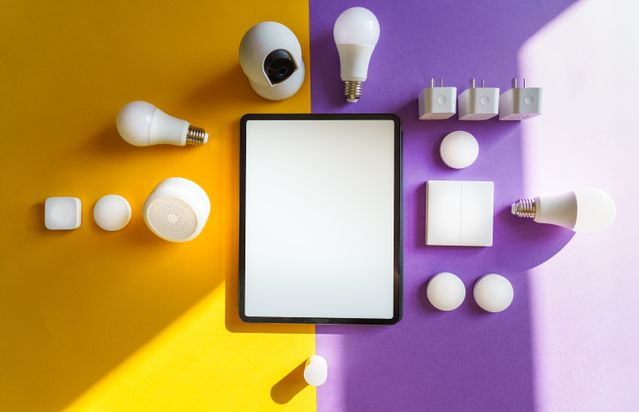
Smart security cameras help homeowners monitor entrances, driveways, gardens, and indoor spaces. Depending on the model, they may provide live video, motion detection, night vision, two-way audio, and recorded footage.
Many cameras send notifications when they detect movement. Some can distinguish between people, vehicles, and other motion, potentially reducing unnecessary alerts.
When choosing a camera, consider:
- Video quality: Clear footage can make it easier to identify relevant details.
- Night vision: Infrared or other low-light features support monitoring after dark.
- Storage options: Recordings may be stored locally, in the cloud, or through a combination of both.
- Power supply: Devices may use wired power, batteries, or solar-assisted charging.
- Weather resistance: Outdoor cameras need suitable protection against rain, dust, and temperature changes.
Camera placement is equally important. Entrances and other relevant access points may be useful locations, but cameras should be positioned to avoid unnecessary recording of neighbors or public areas.
Homeowners should also review recording settings and local privacy requirements before installing indoor or outdoor cameras.
Smart Video Doorbells
A smart video doorbell combines a doorbell with a camera and communication features. When someone approaches or presses the doorbell, the device can send a notification to a connected phone.
Depending on its capabilities, a video doorbell may allow users to see visitors, speak through two-way audio, and review recorded events when they are away from home.
These devices can be particularly useful for:
- Checking who is at the front door before opening it.
- Monitoring package deliveries.
- Communicating with visitors remotely.
- Reviewing activity near the entrance.
Some models include motion detection, night vision, or package alerts. Others require a subscription for extended video history or specific advanced features.
Before buying one, check whether it works with your existing doorbell wiring, Wi-Fi network, and preferred smart home platform. Also consider how long recordings are retained and whether additional storage fees apply.
Smart Locks and Keyless Entry
Smart locks provide alternatives or additions to conventional keys. Depending on the model, a door can be unlocked using a smartphone, keypad, fingerprint reader, or authorized digital credential.
Many smart locks support temporary or scheduled access codes. This can be helpful when giving access to a cleaner, contractor, guest, or family member without handing over a physical key.
Useful features may include:
- Remote locking and unlocking.
- Notifications when the lock is used.
- Temporary access codes.
- Automatic locking after a set period.
- Integration with compatible alarms or smart home systems.
Not every smart lock supports every feature, and remote control may depend on a separate hub or internet connection.
Security is still important: use strong account authentication, keep the device software updated, and understand how to access the property if the battery runs out or the system becomes unavailable. Choose a lock that fits your door and meets relevant physical security standards.
Smart Motion and Entry Sensors
Motion sensors and door or window sensors help detect activity that may require attention. A motion sensor can identify movement in a monitored area, while a contact sensor can report when a door or window opens.
These devices are often part of a larger alarm system and can trigger notifications, audible alarms, or other automated actions.
For example, a contact sensor on a ground-floor window might notify the homeowner when the window opens while the security system is armed. A motion sensor in a hallway could activate an alarm if movement is detected during a period when the home should be empty.
Placement affects performance. Pets, heating systems, direct sunlight, and other environmental factors may influence some sensors. Follow the manufacturer's installation guidance and test each device after setup.
Sensors can also be used for everyday convenience, such as switching on lights when someone enters a room.
Smart Alarms and Security Hubs
A smart alarm system connects multiple security devices and coordinates their activity. It may include a central hub, keypad, siren, entry sensors, motion detectors, and optional professional monitoring.
A connected system can notify users when a sensor is triggered and may allow them to arm or disarm the alarm remotely.
Some hubs can continue operating locally during an internet outage, while remote notifications and cloud-based functions may become unavailable. Battery backup and cellular connectivity can provide additional resilience on supported systems.
When evaluating an alarm system, check whether it offers:
- Audible alerts and configurable notifications.
- Battery backup.
- Local operation without internet access.
- Optional professional monitoring.
- Compatibility with existing smart devices.
- Clear procedures for emergency alerts and false alarms.
A hub can simplify device management, but compatibility should be verified before purchasing several products from different manufacturers.
Smart Lighting for Added Security
Smart lighting can support home security by illuminating entrances, pathways, and outdoor areas when movement is detected or at scheduled times.
For example, an outdoor light connected to a motion sensor can switch on when someone approaches a side entrance. Indoor lights can also be scheduled to create the appearance of activity while residents are away.
Some smart lighting systems can be linked to cameras or alarms, allowing several devices to respond to the same event.
However, lighting is a supporting measure rather than a complete security solution. Bright lights do not prevent every intrusion, and automated schedules should avoid obvious patterns when the home is unoccupied.
Choose outdoor lights rated for the relevant weather conditions, and position them to improve visibility without shining unnecessarily into neighboring homes.
Smart Smoke, Carbon Monoxide, and Water Leak Detectors
Home security also includes protecting people and property from environmental hazards. Smart smoke alarms, carbon monoxide detectors, and water leak sensors can provide early warnings of potentially dangerous conditions.
Depending on the model, these devices may send alerts to a phone when a hazard is detected. Water leak sensors can be placed near washing machines, water heaters, sinks, or other areas where leaks may occur.
These devices are useful because problems can develop when no one is home. A timely notification may help residents or designated contacts respond sooner.
However, connected features should not replace properly installed, certified safety equipment. Check local requirements, follow manufacturer instructions, and test alarms regularly. If a device depends on internet access for remote notifications, understand what happens during a network or power outage.
Smart Home Security Devices at a Glance
|
Device |
Main Function |
What to Consider |
|
Security camera |
Records or streams video |
Storage, placement, privacy, and power |
|
Video doorbell |
Monitors and communicates with visitors |
Wi-Fi, wiring, and subscription fees |
|
Smart lock |
Controls door access |
Backup access, compatibility, and account security |
|
Motion sensor |
Detects movement |
Placement, pets, and false alarms |
|
Entry sensor |
Detects door or window openings |
Battery life and installation |
|
Smart alarm hub |
Coordinates security devices |
Backup power and offline functionality |
|
Smart lighting |
Illuminates selected areas automatically |
Weather resistance and positioning |
|
Hazard detector |
Alerts users to smoke, carbon monoxide, or leaks |
Certification, testing, and alert reliability |
How to Choose the Right Smart Home Security Setup
The best system is not necessarily the one with the most devices. Start by identifying the main risks and deciding which areas require monitoring.
Assess Your Property
Consider entrances, ground-floor windows, garages, shared building access, and areas where hazards such as water leaks may occur. Renters may need wireless devices that do not require permanent installation, while homeowners may have more options for wired systems.
Check Compatibility
Some devices connect directly to Wi-Fi, while others use a hub or protocols such as Zigbee, Z-Wave, or Matter. Check compatibility with your existing equipment and preferred smart home platform before purchasing.
Compare Total Costs
The initial device price is only part of the expense. Consider subscriptions, cloud storage, professional monitoring, batteries, installation, and possible replacement costs.
Prioritize Reliability
Security devices should work predictably. Look for clear alerts, regular software updates, dependable power options, and a backup plan for internet outages.
Protect Your Digital Accounts
Smart security devices can create risks if their accounts or networks are poorly protected. Use unique passwords, enable multifactor authentication where available, update firmware, and disable features you do not need. Secure your home Wi-Fi network and review who has access to shared devices.
Common Mistakes to Avoid
A connected security system can provide useful information, but poor setup may limit its effectiveness.
- Installing cameras without planning their coverage: Check blind spots and ensure important access points are visible.
- Ignoring privacy settings: Limit recording to appropriate areas and control who can view footage.
- Relying only on remote notifications: Notifications may be delayed or unavailable during outages.
- Skipping software updates: Updates can address security vulnerabilities and reliability problems.
- Buying incompatible devices: Verify integration requirements before expanding the system.
- Forgetting maintenance: Replace batteries, test sensors, and confirm that alarms and backups work as expected.
A well-maintained system is generally more useful than a larger collection of devices that are poorly configured.
Conclusion
Smart devices can make home security more convenient by helping residents monitor entrances, control access, detect movement, and receive alerts about potential hazards. Cameras, video doorbells, smart locks, sensors, alarms, lighting, and environmental detectors each serve a different purpose.
The most effective setup combines suitable devices with good physical security practices, reliable maintenance, and strong digital protection. By assessing your property's needs and checking compatibility before buying, you can build a connected system that provides useful protection without unnecessary expense or complexity.
Frequently Asked Questions
Use unique passwords, enable multifactor authentication where available, install software updates, secure your Wi-Fi network, and limit account access to trusted users. Choose devices from manufacturers that provide ongoing security updates and clear privacy controls.


Was This Article Helpful?
Click on a star to rate it!
Thank you for your vote!
Average Rating: 0/5 Votes: 0
Be the first to rate this post!

Tech entrepreneur & digital strategist with over 9 years of experience in backend development and more than 5 years in executive leadership. Education Software and Web developer. More than 20 years of experience in software and web development.
View LinkedIn ProfileLatest Posts

Transport Policy Changes and Their Impact
Smart Devices for Home Security

Innovation Strategies for Businesses